Got a message from your lawyer?
If your law firm sent you a text or email with a link to AffidavitWriter, this page explains what it is and what happens next.
In short: your solicitor or lawyer uses AffidavitWriter to collect your side of the story. You answer questions in a simple chat on your phone, in your own time. Your solicitor reads everything.
What is this?
AffidavitWriter is a secure website that law firms use to collect statements from their clients and witnesses. Instead of writing everything down on your own, you chat with an AI assistant that asks you simple questions about what happened. The AI assistant works for your solicitor. It is not a person and it is not a lawyer.
The AI assistant will
- Ask what you saw, heard and did
- Ask for dates, places and who else was there
- Ask if you have photos or documents
- Save everything for your solicitor to read
The AI assistant will never
- Tell you whether you will win
- Give you legal advice
- Ask for money, bank details or passwords
- Pretend to be your solicitor
Is it real? How to check
It is good to be careful with links. A real message from AffidavitWriter will always:
- Start with the name of your law firm and name your solicitor.
- Use a link that starts with https://affidavitwriter.com.au/
- Be about a legal matter you already know your solicitor is working on.
- Never ask you to pay, or for bank details, card numbers or passwords.
What to expect
- Open the linkTap the link in your text or email. It works in the normal web browser on your phone or computer. There is nothing to download.
- Enter a codeWe send a 6-digit code to your phone or email to check it is you. You get a new code every time you come back — this keeps your information safe, even on a shared phone.
- Chat about what happenedThe AI assistant asks questions one at a time. Answer in your own words. Most people take 15 to 20 minutes the first time.
- Stop whenever you likeEverything saves as you go. Come back to add something you remember, or answer new questions from your solicitor.
- Your solicitor takes it from thereYour solicitor reads what you wrote and may ask a few more questions. They write any legal document and check it with you before anything is signed.
What you’ll see on your phone
These pictures show an example. Your screens will show your own law firm’s name and your solicitor’s name.
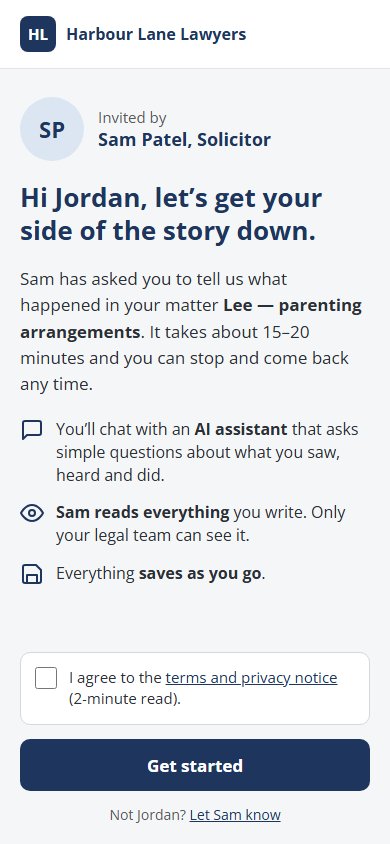
1. Welcome. Who invited you, and what happens next. 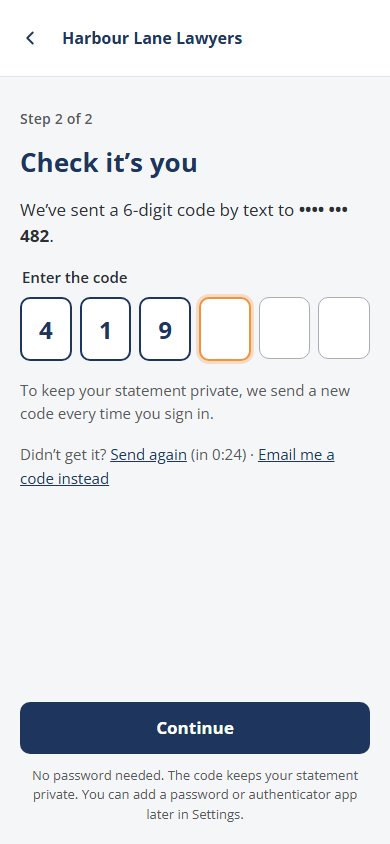
2. Enter your code. A new 6-digit code each time you come back. 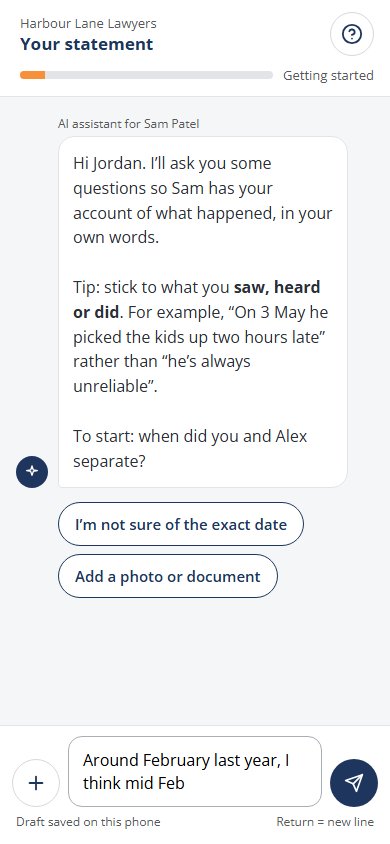
3. Chat. The AI assistant asks one question at a time. Answer in your own words.
Your privacy
More detail: Privacy policy · How we keep data safe
Help
I lost the link or it has expired
Ask your solicitor to send you a new one. For your safety, each link only works for you and stops working after a while.
My code has not arrived
Wait a minute, then tap “Send a new code”. Check the email junk folder. If your phone number or email has changed, tell your solicitor.
Why do I need a new code every time?
Your statement is private. Asking for a fresh code each time stops anyone else who picks up your phone or computer from reading it.
I made a mistake in what I wrote
Just tell the assistant, for example “I got the date wrong, it was Tuesday 3 November.” Your solicitor sees the correction.
I find this upsetting
Take a break whenever you need to — nothing is lost. If you are in danger, call your local emergency number — for example 000 in Australia, 111 in New Zealand, 999 in the UK, 911 in the US and Canada, or 112 in Europe. For support, you can call a crisis line such as Lifeline on 13 11 14 in Australia.
I need an interpreter, or help reading the screen
Tell your solicitor and they can arrange help. The site works with screen readers and phone text-size settings.
I don’t want to use the chat
That is fine. Contact your solicitor and they can take your statement another way.